All Caps - CTRL+SHIFT+A
Annotation - ALT+CTRL+M
Auto Format - ALT+CTRL+K
Auto Text - F3 or ALT+CTRL+V
Bold - CTRL+B or CTRL+SHIFT+B
Bookmark - CTRL+SHIFT+F5
Copy - CTRL+C or CTRL+INSERT
Copy Format - CTRL+SHIFT+C
Copy Text - SHIFT+F2
Create Auto Text - ALT+F3
Date Field - ALT+SHIFT+D
Delete Back Word - CTRL+BACKSPACE
Delete Word - CTRL+DELETE
Dictionary - ALT+SHIFT+F7
Do Field Click - ALT+SHIFT+F9
Doc Maximize - CTRL+F10
Doc Move - CTRL+F7
Doc Restore - CTRL+F5
Doc Size - CTRL+F8
Grow Font - CTRL+SHIFT+.
Grow Font One Point - CTRL+]
Hanging Indent - CTRL+T
Header Footer Link - ALT+SHIFT+R
Help - F1
Hidden - CTRL+SHIFT+H
Hyperlink - CTRL+K
Indent - CTRL+M
Italic - CTRL+I or CTRL+SHIFT+I
Justify Para - CTRL+J
Left Para - CTRL+L
Line Up Extend - SHIFT+UP
List Num Field - ALT+CTRL+L
Outline - ALT+CTRL+O
Outline Collapse - ALT+SHIFT+- or ALT+SHIFT+NUM -
Outline Demote - ALT+SHIFT+RIGHT
Outline Expand - ALT+SHIFT+=
Outline Expand - ALT+SHIFT+NUM +
Outline Move Down - ALT+SHIFT+DOWN
Outline Move Up - ALT+SHIFT+UP
Outline Promote - ALT+SHIFT+LEFT
Outline Show First Line - ALT+SHIFT+L
Lock Fields - CTRL+3 or CTRL+F11
Web Go Back - ALT+LEFT
Web Go Forward - ALT+RIGHT
Word Left - CTRL+LEFT
Word Left Extend - CTRL+SHIFT+LEFT
Word Right - CTRL+RIGHT
20090407

20090401
SSH through SOCKS proxy
compile connect source and put to any bin
add to ssh config file:
Host * ProxyCommand connect -S socks.proxy.la %h %pSSH through SOCKS proxy
compile connect source and put to any bin
add to ssh config file:
Host * ProxyCommand connect -S socks.proxy.la %h %piPhone Tethering
- establish wifi connection (comp + iphone)
- run socks (3proxy) from mobileterminal
- surf anything from mobile safari to establish EDGE
- set browser's socks proxy with iphone IP address & port 1080
- if firefox, additional step: set network.proxy.socks_remote_dns to true
iPhoneModem app is annoying

How to change MySQL user password
at the "
*I always forget this, I need to jot down*
mysql>" prompt, type:set password = password("yournewpassword");*I always forget this, I need to jot down*
20090224
Clippy! I miss thou!!
I thought it was a restriction or expired evaluation time but its NOT!
They have replaced the way to show copy & paste button to by holding
[123] even for copying an sms, you need to hold them. Thank God Clippy
is back!
They have replaced the way to show copy & paste button to by holding
[123] even for copying an sms, you need to hold them. Thank God Clippy
is back!
Sent from my iPhone

20090220
Now currently converting 2 laptops to Ubuntu. Lately I've been
promoting solution to run Windows on VirtualBox. The catch is of
course, less virus threat & VB snapshot. Compiz effect also gives
bonus to attraction.
promoting solution to run Windows on VirtualBox. The catch is of
course, less virus threat & VB snapshot. Compiz effect also gives
bonus to attraction.
P/s: mood is unhappy because my huge hfs filesystem is corrupt due to
improper usb removal
20090202
backup-sms.sh
I always have the feeling that huge sms.db will slow down SMS application startup. So I created a script to be run in Terminal and I wish I can do an application for this.
#!/bin/sh
# backup-sms.sh
#
#
# Created by amanyus on 2/2/09.
# Copyright 2009 __MyCompanyName__. All rights reserved.
DATE=`date +%y%m%d`
echo "${DATE}"
if test -f /var/mobile/Library/SMS/sms.db.$DATE
then echo "Today's backup already exists."; exit; fi
if ! test -f /var/mobile/Library/SMS/sms.db.$DATE
then cp -npv /var/mobile/Library/SMS/sms.db /var/mobile/Library/SMS/sms.db.$DATE; fi
ls -lrt /var/mobile/Library/SMS/
if test -f /var/mobile/Library/SMS/sms.db.$DATE
then echo "Today's backup successful"; fi
20090201

Aperture: A tiny thing that saves a lot of time.

Just for expressing an excitement. A new thing I just discovered and love about Aperture.
I have a lot of pictures and my last trip to Langkawi produced more than 1700 shots - and my mother wants them ALL! So as I started to export hundreds of pictures, I went through one by one to reject bad photos - even the exporting is still running (right now). Suddenly I came to a photo that attracts me. After a simple edit, I decided to upload it to Flickr and this is the good part. I don't have to wait for the earlier exporting process to complete before exporting a new picture. It really saves my time.
What a good software design in customer point of view!
20081202
Intrepid On Acer Aspire 4720
Previous day, I had setup the latest Ubuntu on my sister's laptop. I
was surprised of how cool & beautiful Linux these days. It is even
easier to setup comparing to old days. I also compared Ubuntu with
Fedora Core 10 on my VirtualBox. I have to agree, I like pre-installed
Ubuntu better. Picasa also works great.
was surprised of how cool & beautiful Linux these days. It is even
easier to setup comparing to old days. I also compared Ubuntu with
Fedora Core 10 on my VirtualBox. I have to agree, I like pre-installed
Ubuntu better. Picasa also works great.
Now, with VirtualBox, she keep a copy of an uninfected Windows. She
still need it I for her iPod because iTunes doesn't work well with
Wine. But still a few issue she face - USB & Shared Folder in
VirtualBox.
20081125
Installing NTFS-3G on your Mac OS X will render your Windows drives invisible from your "Startup Disk" preference pane. [1] They suggested disabling or uninstalling to bring the disappeared drive back. But I accidentally see a Windows partition in my VMWare Virtual Machine Library.
20081120
20081118
Convert plist binary to xml, back and forth.
plutil -convert xml1 some_file.plistplutil -convert binary1 some_other_file.plist
To check, use file something.plist
Leopard Re Installation: Part 2
I reformat using the same filesystem my external hard drive uses. Then set UID to 1000 in the System Preferences > Accounts > Advanced Options (right click on username). After that chown whole home directory.
Leopard Re Installation: Backup & Restore Issue
I wanted to replace my OS X Server because of lack of Internet Sharing feature. So I do both Time Machine backup and manual backup before making a fresh OS X installation. These are the issue that I faced.
Restoring using Time Machine right after Leopard Installation is not as I expected. There will be folders like 'System (from old mac)', 'Applications (from old mac)'. For me, this is not neat.
Your OSX filesystem must have the same format as your Time Machine backup filesystem. I'm using HFS Journaled with Case Sensitive, but my external hard disk is using HFS Journaled NOT with Case Sensitive. I have to reformat either my OS X partition, or my external hard disk.
Restoring files from Time Machine is strict because of UID. My user uses 501 as UID but my last Server system was using 1000 as UID. So restoring could get complicated.
Right now I'm going to change my UID and reboot and see what will happen.
Restoring using Time Machine right after Leopard Installation is not as I expected. There will be folders like 'System (from old mac)', 'Applications (from old mac)'. For me, this is not neat.
Your OSX filesystem must have the same format as your Time Machine backup filesystem. I'm using HFS Journaled with Case Sensitive, but my external hard disk is using HFS Journaled NOT with Case Sensitive. I have to reformat either my OS X partition, or my external hard disk.
Restoring files from Time Machine is strict because of UID. My user uses 501 as UID but my last Server system was using 1000 as UID. So restoring could get complicated.
Right now I'm going to change my UID and reboot and see what will happen.
20080927
Phone Number Fix on iPhone (localization)
Problem is iPhone doesn't recognize callers. Although they exist in the address book, iPhone only show their number with extra country code prefix.
Replace PhoneNumberTemplates.plist
in the /System/Library/PrivateFrameworks/AppSupport.framework
*Best to just backup/rename than to remove.
Replace PhoneNumberTemplates.plist
in the /System/Library/PrivateFrameworks/AppSupport.framework
*Best to just backup/rename than to remove.
Custom Ringtones on iPhone
Convert audio file to use AAC codec and change the extension to m4r. Must not exceed 40 seconds.
Fix Youtube on iPhone
Unzip unlock.zip
to /private/var/root/Library/Lockdown and remove pair_records folder.
*Best to just backup/rename than to remove.
to /private/var/root/Library/Lockdown and remove pair_records folder.
*Best to just backup/rename than to remove.
20080917
Shell Auto-completion
I feel it is too late for me to realize that auto-completion using ESCAPE ESCAPE is actually came from a shell variable, $EDITOR
Few servers gave me hard times on stty important function. So I:
EDITOR=`which vi`; export EDITORFew servers gave me hard times on stty important function. So I:
echo "stty erase ^H
stty kill ^U
stty intr ^C
TERM=vt100
EDITOR=`which vi`
export TERM EDITOR" >> ~/.profile
20080910
Use putty to access vnc using ssh tunnel
This is to overcome firewall which filter connection on the application layer. In putty:
On vnc, connect to
Hostname: ssh_server
X display location: localhost:0
Source port: 5901
Destination: vnc_server:5900
On vnc, connect to
localhost:1
20080822
16:06 < codept> is there any tool to ...like ...present logs in the /var/log
...in more simpler format, let say httpd-access.log, a tool
that can analyze it and gives number of connection for each
unique source, ...that is just an idea
16:10 < geek00l> codept, we call it - awk, sed, sort, uniq, grep and fuck
...in more simpler format, let say httpd-access.log, a tool
that can analyze it and gives number of connection for each
unique source, ...that is just an idea
16:10 < geek00l> codept, we call it - awk, sed, sort, uniq, grep and fuck
20080813
Be Gentle With Your Keyboard
I just learn that, (after years of facing terminal), the more you minimize your typing mistakes, lesser the potential of screwing up or end up your work dissatisfied. It helps me thinking better too.
Think before you type. Think again before you press enter. Avoid typing too fast (because there are kids who think typing fast shows that they're good). Type slow not too slow, sit back and relax. Enjoy the cleanliness of your terminal output.
p/s: Yeah, I've worked with business critical environment... and I did screw up a few times :-p And this came to my mind while I was watching a 'really good' but not sys admin guy, typing neatly.
Think before you type. Think again before you press enter. Avoid typing too fast (because there are kids who think typing fast shows that they're good). Type slow not too slow, sit back and relax. Enjoy the cleanliness of your terminal output.
p/s: Yeah, I've worked with business critical environment... and I did screw up a few times :-p And this came to my mind while I was watching a 'really good' but not sys admin guy, typing neatly.
20080812
Start postgresql, create database and access it
Platform:FreeBSD
Install: using ports
Binary location:
Don't forget to modify
# su - pgsql
$ initdb -D /usr/local/pgsql/data
(if only doesn't exist)
$ postgres -D /usr/local/pgsql/data >logfile 2>&1 &
$ createdb test
$ psql test
Install: using ports
Binary location:
/usr/local/binDon't forget to modify
rc.conf
20080807
httpd.conf | php module
beside LoadModule php5_module libexec/apache22/libphp5.so

Edit Aug 12 2008:
AddType application/x-httpd-php .php
AddType application/x-httpd-php-source .phps

Edit Aug 12 2008:
AddType application/x-httpd-php .php
AddType application/x-httpd-php-source .phps
20080725
Diriwayatkan dari Abu Hurairah r.a., ia berkata: Rasulullah bersabda:“Wanita dinikahi karena empat perkara; karena hartanya, karena kedudukannya/ keturunannya, karena kecantikannya dan keranan agamanya. Maka, pilihlah yang baik agamanya niscaya engkau beruntung.” (Diriwayatkan oleh al-Bukhari (3/242), Muslim (2/1086), Abu Dawud (2047), an—Nasaa’i (6/6 8) dan Ibnu Majah (1858))
20080720
Failed to enable the 'httpready' Accept Filter
[bambino@bambino ~]$ sudo apachectl start
[Mon Jul 21 14:42:39 2008] [warn] (2)No such file or directory: Failed to enable the 'httpready' Accept Filter
[bambino@bambino ~]$ sudo kldload accf_http
[bambino@bambino ~]$ sudo apachectl restart
[bambino@bambino ~]$
20080719
streamyx settings for ADSL wireless router
- enter correct username and password
- vpi : 0 (zaro or 8 if you want)
- vci : 35
using command line mail
Simply mail to recipient,
$
Enter subject, press enter, and type mail content. Ctrl + D to finish.
To include content from a text file, for example, msg.txt, simply enter ~r ./msg.txt at the first line of the mail content.
$
To list mail headers in inbox
$
To list mail saved msg headers in mailbox (~/mbox)
$
Inside mail console (don't really know what to call exactly), you can use h to list again mail headers, and enter any number to read specific mail.
$
mail RECIPIENTEnter subject, press enter, and type mail content. Ctrl + D to finish.
To include content from a text file, for example, msg.txt, simply enter ~r ./msg.txt at the first line of the mail content.
$
mail RECIPIENT -c CCPERSONTo list mail headers in inbox
$
mail -HTo list mail saved msg headers in mailbox (~/mbox)
$
mail -FInside mail console (don't really know what to call exactly), you can use h to list again mail headers, and enter any number to read specific mail.
RCS | Revision Control System
For first time:
Please make sure you understand before doing it. Google for RCS.
- mkdir RCS (ignore if folder already exists)
- rlog example.conf
- if rlog returns no file or dir, check in the file and enter description:
ci -u example.conf - if rlog returns information, check out the file to edit:
co -l example.conf - if it's not locked, you may edit the file with your favorite editor and save it.
- check in the file and write a log:
ci -u example.conf - you may check the information using rlog again.
Please make sure you understand before doing it. Google for RCS.
20080718
Set mysql root password
To set password for the first time:
To change password:
To login with password:
To change password mysql sql command:
$ mysqladmin -u root password NEWPASSWORDTo change password:
$ mysqladmin -u root -p OLDPASSWORD NEWPASSWORDTo login with password:
$ mysql -u root -p PASSWORDTo change password mysql sql command:
mysql> use mysql;
mysql> update user set password=OLDPASSWORD("NEWPASSWORD") where User='USERNAME';
mysql> flush privileges;
mysql> quit20080716
Unresponsive Dock and Finder
I can't access Dock just now. No respond. And I'm unable to go through Finder too, so I can't get a touch on Terminal. I forced quit some applications, but there's only TextEdit which I left because there's work which wasn't saved yet. Then how do I rescue this without force quitting the TextEdit which I'm not even sure if it is the cause of all this? But I'm pretty sure that it was about the hung Dock. I really wanted to avoid logging out or reboot.
But user fast switch is enabled. I logged in as administrator and used terminal to kill other's Dock process.
PS=`ps aux | awk '{if($1="amanyus") print}' | grep -i dock`; kill $PS
PS is temporary shell variable to hold a value. This value is coming from a ps command after few filtering with awk and grep. Awk only print lines that match the first column with user amanyus, which result in all amanyus' processes. Next with grep, only match insensitive case dock rather that all processes under user amanyus because we only want to find Dock process and put in the PS variable. Up to this point, PS variable will hold the process number of amanyus' Dock. After the semicolon, the process will be killed.
Silly is you just can simply use
p/s: Hey, I forgot about spotlight at the first time to search Terminal, but not sure if it would work.
But user fast switch is enabled. I logged in as administrator and used terminal to kill other's Dock process.
PS=`ps aux | awk '{if($1="amanyus") print}' | grep -i dock`; kill $PS
PS is temporary shell variable to hold a value. This value is coming from a ps command after few filtering with awk and grep. Awk only print lines that match the first column with user amanyus, which result in all amanyus' processes. Next with grep, only match insensitive case dock rather that all processes under user amanyus because we only want to find Dock process and put in the PS variable. Up to this point, PS variable will hold the process number of amanyus' Dock. After the semicolon, the process will be killed.
Silly is you just can simply use
ps aux | grep amanyus | grep Dock and kill the Dock's process without bothering with awk command =pp/s: Hey, I forgot about spotlight at the first time to search Terminal, but not sure if it would work.
20080604

20080603

20080526
Screwed Up: Open Directory Part 3
drwx------+   6 diradmin  staff    204 May 25 16:36 Desktop
drwx------+  22 diradmin  staff    748 May 19 09:45 Documents
drwx------+ 109 diradmin  staff   3706 May 25 18:52 Downloads
drwx------+  42 diradmin  staff   1428 May 19 09:18 Library
drwx------+   9 diradmin  staff    306 May 25 17:13 Movies
drwx------+   5 diradmin  staff    170 May 13 13:00 Music
drwx------+  11 diradmin  staff    374 May 25 15:40 Pictures
drwxr-xr-x+   5 diradmin  staff    170 May 14 08:58 Public
drwxr-xr-x+  11 diradmin  staff    374 May 23 00:06 Sites
drwxr-xr-x@ 314 diradmin  staff  10676 May 26 09:47 mp3
The owner of my original home folder gave me a clue. They are all owned by directory admin. And I remember last time when I changed the Open Directory role to the Directory Master, we need to set password and verified it. There is also a username already written there as diradmin. So what I did is I set the role to standalone and set it back again to Directory Master. This time I replace the diradmin as my original account name. I backed up before commit to prevent any loss or the potential of my home folder be overwritten. Fortunately it doesn't. No files affected. The owner also automatically changed. And once again, the day is saved thanks to the powerpuff mac :-P
drwx------+   6 amanyus  staff    204 May 25 16:36 Desktop
drwx------+  22 amanyus  staff    748 May 19 09:45 Documents
drwx------+ 109 amanyus  staff   3706 May 25 18:52 Downloads
drwx------+  42 amanyus  staff   1428 May 19 09:18 Library
drwx------+   9 amanyus  staff    306 May 25 17:13 Movies
drwx------+   5 amanyus  staff    170 May 13 13:00 Music
drwx------+  11 amanyus  staff    374 May 25 15:40 Pictures
drwxr-xr-x+   5 amanyus  staff    170 May 14 08:58 Public
drwxr-xr-x+  11 amanyus  staff    374 May 23 00:06 Sites
drwxr-xr-x@ 314 amanyus  staff  10676 May 26 09:47 mp3
Screwed Up: Open Directory Part 2
amanyus:log root# host amanyus.puj52
;; connection timed out; no servers could be reached
After few smacks on the head lol, I played around with DNS service on the Server. I created a zone, named it and added machine record in it. That solved my problem.
amanyus:log root# nslookup amanyus.puj52
Server:  127.0.0.1
Address: 127.0.0.1#53

Name: amanyus.puj52
Address: 192.168.1.14

amanyus:log root# host amanyus.puj52
amanyus.puj52 has address 192.168.1.14
Since the DNS is clean, Kerberos finally running. But the my usual login still doesn't show up :-(
20080525
Screwed Up: Open Directory
Server is sucks when waking up from sleep. I suck too. Coz I made Server run on portables. I'm not sure of this but I think Open Directory or Kerberos service is affected by wake and sleep mechanism. There was time when my password doesn't work if I typed in immediately after the Server woke up.
Tonight something went wrong which I don't have any clue why. Failed to login even after few reboots. So I suspect the authentication system - which I'm not sure LDAP or Kerberos - might not running or maybe not even started. So I logged in as root and check the System Preferences where I found out that my usual account is gone. Now that really bothers me. I checked my home directory and fortunately it's there.
Server Admin show LDAP and Kerberos stopped. I've checked through numerous posts on the internet. There's one instruction that says to set the Open Directory role as standalone. I followed without knowing what I'm doing. And that is where I screwed up. I can't change back to the original role.
Now I have to figure out what the heck is happening. A lot messages in the logs like has got something to do with DNS. Hope someone tells me how to make the changeip happy.
Tonight something went wrong which I don't have any clue why. Failed to login even after few reboots. So I suspect the authentication system - which I'm not sure LDAP or Kerberos - might not running or maybe not even started. So I logged in as root and check the System Preferences where I found out that my usual account is gone. Now that really bothers me. I checked my home directory and fortunately it's there.
Server Admin show LDAP and Kerberos stopped. I've checked through numerous posts on the internet. There's one instruction that says to set the Open Directory role as standalone. I followed without knowing what I'm doing. And that is where I screwed up. I can't change back to the original role.
Now I have to figure out what the heck is happening. A lot messages in the logs like has got something to do with DNS. Hope someone tells me how to make the changeip happy.
amanyus:etc root# sudo changeip -checkhostname
Primary address     = 192.168.1.12
Current HostName    = amanyus.puj52
The DNS hostname is not available, please repair DNS and re-run this tool.
20080523
PHP and Leopard Server : mach-o, but wrong architecture
May 22 19:33:34 amanyus org.apache.httpd[96895]: httpd: Syntax error on line 143 of /private/etc/apache2/httpd.conf: Cannot load /usr/libexec/apache2/libphp5.so into server: dlopen(/usr/libexec/apache2/libphp5.so, 10): no suitable image found. Did find:\n\t/usr/libexec/apache2/libphp5.so: mach-o, but wrong architecture
May 22 19:33:34 amanyus com.apple.launchd[1] (org.apache.httpd[96895]): Exited with exit code: 1
May 22 19:33:34 amanyus com.apple.launchd[1] (org.apache.httpd): Throttling respawn: Will start in 10 seconds
Insert installation disc. Open up terminal.
$ cd /Volumes/Mac\ OS\ X\ Server\ Install\ Disc/System/Installation/Packages/
$ open .
Run Essentials.pkg and install it to an empty filesystem or empty folder. the libphp.so will be inside [install_dir]/usr/libexec/apache2 directory.
Screwed Up: Apache2 & PHP Part 2
I went through tough times figuring out how. Google tried to help me but the results are meant for Leopard, not Server. I can't find any pre-compiled php for Server. I also tried to set CFLAGS and LDFLAGS as intruction for Leopard and the compilation failed.
At last I solve it with the Server Installation disc. But you can't find it simply by Finder. Even if you use Finder to look into the package contents, still you won't find the packages used to install all the Server components. I spawned up my terminal and go through the installation disc. There are a lot of packages and I have to install one by one on an empty filesystem so that I will know what each package for. And I found what package installs the libphp.so - the fix is in the next post.
It is fixed. What a relief.
At last I solve it with the Server Installation disc. But you can't find it simply by Finder. Even if you use Finder to look into the package contents, still you won't find the packages used to install all the Server components. I spawned up my terminal and go through the installation disc. There are a lot of packages and I have to install one by one on an empty filesystem so that I will know what each package for. And I found what package installs the libphp.so - the fix is in the next post.
It is fixed. What a relief.
20080522
Screwed Up: Apache2 & PHP
I screwed up. I overwritten pre-installed PHP on Server that cause problem for Apache startup. God help me.
Edit: I suspect that the libphp5.so not compiled to match the correctly architecture. So to make the apache running, I hashed out 2 lines that load php module inside

 May 22 19:33:34 amanyus org.apache.httpd[96895]: httpd: Syntax error on line 143 of /private/etc/apache2/httpd.conf: Cannot load /usr/libexec/apache2/libphp5.so into server: dlopen(/usr/libexec/apache2/libphp5.so, 10): no suitable image found.  Did find:\n\t/usr/libexec/apache2/libphp5.so: mach-o, but wrong architecture
May 22 19:33:34 amanyus com.apple.launchd[1] (org.apache.httpd[96895]): Exited with exit code: 1
May 22 19:33:34 amanyus com.apple.launchd[1] (org.apache.httpd): Throttling respawn: Will start in 10 seconds
Edit: I suspect that the libphp5.so not compiled to match the correctly architecture. So to make the apache running, I hashed out 2 lines that load php module inside
/private/etc/apache2/httpd.conf. It runs but without php support. So localhost:80 show a nice Server webpage. I also notice that my computer automatically downloads a php source hehe. Because it is un-identifiable.
20080520
Keyboard Volume Control
Silent Volume Control: Shift + F4 or F5
Detailed Volume Control: Shift + Alt + F4 or F5

personal statement | i didn't know they could do this, I was surprised...
Detailed Volume Control: Shift + Alt + F4 or F5

personal statement | i didn't know they could do this, I was surprised...
Size Comparison between TIFF, JPEG & PNG

These are file info for 3 images with different format. It occur to me when I was wondering which format have the best optimization for size, regardless of the quality. Grab application (in Utilities) save snapshots to a TIFF format. I agree Grab made for quality but in a web arena, size does matter. Bandwidth affect a lot of things. Web hosting limited bandwidth, download time and most importantly, our browser cache - performance. So why wait, create an automator plugin

For decoration only.
But it is a different case for screenshot shortcut key. By default it will automatically save to your Desktop as PNG format. Surprisingly, JPEG size is a lot better.

ps | view list of shortcuts key at the System Preferences > Keyboard & Mouse
20080519
Make Blogger Text Justified

By default, blogspot doesn't give you the option to justify text. It looks ugly if its not. So go to you blogger setting and edit the HTML. Insert this line under the Posts section.

Then you will get justified text like what you see on my every posts here. "Lorem ipsum dolor sit amet, consectetur adipisicing elit, sed do eiusmod tempor incididunt ut labore et dolore magna aliqua. Ut enim ad minim veniam, quis nostrud exercitation ullamco laboris nisi ut aliquip ex ea commodo consequat. Duis aute irure dolor in reprehenderit in voluptate velit esse cillum dolore eu fugiat nulla pariatur. Excepteur sint occaecat cupidatat non proident, sunt in culpa qui officia deserunt mollit anim id est laborum."
Access iPhone using Finder
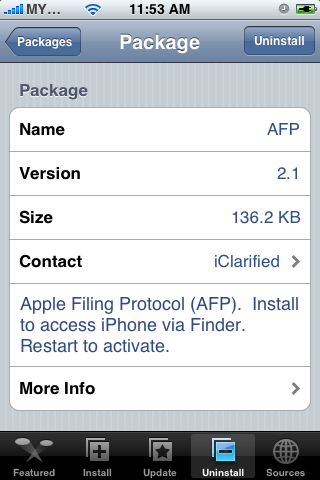
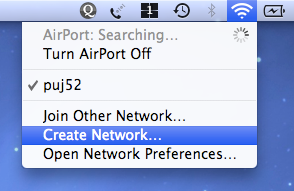
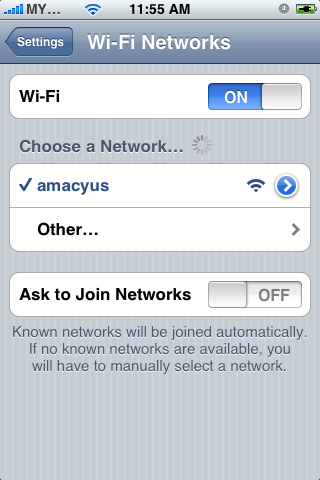
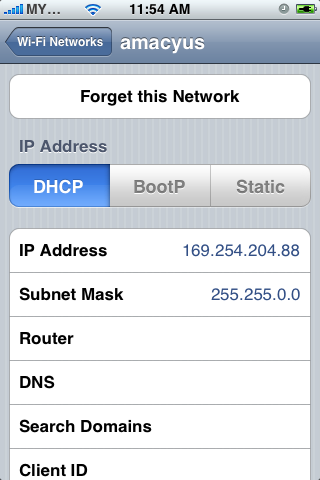
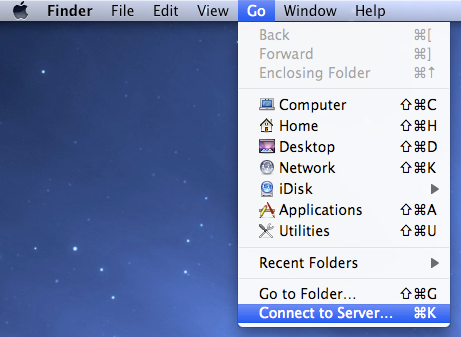
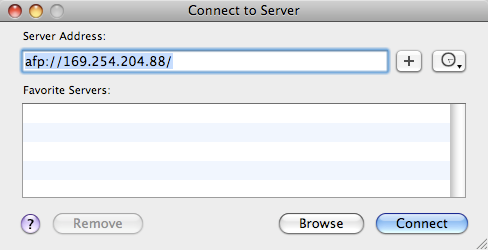
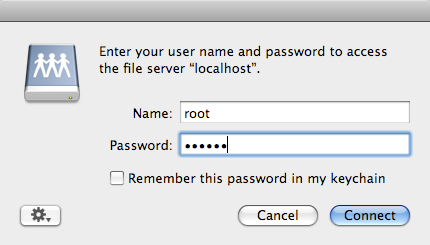
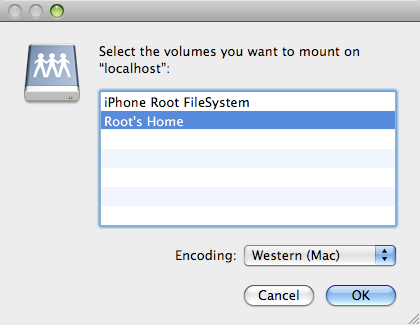
First, make sure you have AFP installed on the iPhone - you need Installer. Turn on Airport on your Mac and create network from the airport icon menu. If the network is set, you'll see the airport icon changed. Set iPhone to join the network you just created. Take note of the iPhone IP address. On your mac, activate Finder. From the top menu, choose Go > Connect to Server. Type you iPhone IP address like this example. You will be prompt for login. Type 'root' as user, and 'alpine' for password. Choose Root's Home instead of Root Filesystem because the earlier has bigger disk space.
For what? iPhone as your wireless external disk drive.
For what? iPhone as your wireless external disk drive.


20080516
Get Automated
Automator has been there since Tiger. I had a lot of Automator plugins on Tiger last time. The main goal of Automator is it can simplify repetitive work thus save you a lot of time.

I take digital photo experience as an example. When we take pictures using the digital camera, it normally save the file using a combination of letters and sequential number, right?

Let say we want to rename all image files so they will be more meaningful. Automator lets you rename all of them once without you rename each file one by one.

You can save every workflow you created as a plugin. Plugin can help you run workflow directly from your Finder so that you don't have to create the same workflow each time you come to a same task.

I take digital photo experience as an example. When we take pictures using the digital camera, it normally save the file using a combination of letters and sequential number, right?

Let say we want to rename all image files so they will be more meaningful. Automator lets you rename all of them once without you rename each file one by one.

You can save every workflow you created as a plugin. Plugin can help you run workflow directly from your Finder so that you don't have to create the same workflow each time you come to a same task.
Infrared Apple Remote Does Work, FrontRow Can't Find iTunes Songs

Infrared remote is disabled by default on Server. You can find the option under Security section in System Preferences. Then you will discover that FrontRow would not be able to find songs in your iTunes. Thanks to appleguru1, he repackaged the original update and made it available for download.
If you want to backup your original files before upgrading, copy your:
/System/Library/CoreServices/Front Row.app
/System/Library/PrivateFrameworks/BackRow.framework
/System/Library/LaunchAgents/com.apple.RemoteUI.plist

Window minimize disabled. I wonder when Apple will solve this. It's been bugging me since Tiger.
It intrigues people when...
 May 16 15:13:59 amanyus ReportCrash[6560]: Formulating crash report for process Finder[226]
May 16 15:13:59 amanyus com.apple.launchd[207] ([0x0-0xb00b].com.apple.finder[226]): Exited abnormally: Segmentation fault
May 16 15:14:02 amanyus mDNSResponder[30]: SetupAddr invalid sa_family 0
May 16 15:14:03: --- last message repeated 1 time ---
May 16 15:14:03 amanyus ReportCrash[6560]: Saved crashreport to /Users/amanyus/Library/Logs/CrashReporter/Finder_2008-05-16-151352_amanyus.crash using uid: 1000 gid: 20, euid: 1000 egid: 20
...because it is rare. At least it didn't take any other application down. Just auto-relaunch Finder.
20080515
Shortcut : Empty Trash
shift + command + delete when your Finder is active.I accidently discovered this few weeks ago. Sometimes we are in the mood of keeping the trash clean. But it is safe to keep trashed files before we realized our now-it-is-important thing gone.
Spotlight Doesn't Search a Thing
Open Terminal application (Application > Utilities > Terminal) and run this command:
This command will turn on indexing on all volumes except impossible volumes such as DVD volumes and unsupported filesystems volumes. mdutil command is a command to manage the metadata stores used by Spotlight. Every volumes are separated-ly managed. Means for example you can turn on indexing on /home only instead of all volumes.
You can check the status first before simply turning on by running this command:
There is a good side for enabling indexing on few Volumes. It will narrow down search with the area that we want. Definitely we don't have to go through / to search documents in /Volumes/ExternalDisk.
PS: Volumes is not mount points. Volumes can be seen on your desktop. The hard disk icon, Macintosh HD is a volume.
Once you turn on indexing, you can see a slow blinking dot at the spotlight button at the top right corner of your Mac.

sudo mdutil -a -iThis command will turn on indexing on all volumes except impossible volumes such as DVD volumes and unsupported filesystems volumes. mdutil command is a command to manage the metadata stores used by Spotlight. Every volumes are separated-ly managed. Means for example you can turn on indexing on /home only instead of all volumes.
You can check the status first before simply turning on by running this command:
sudo mdutil -a -sThere is a good side for enabling indexing on few Volumes. It will narrow down search with the area that we want. Definitely we don't have to go through / to search documents in /Volumes/ExternalDisk.
PS: Volumes is not mount points. Volumes can be seen on your desktop. The hard disk icon, Macintosh HD is a volume.
Once you turn on indexing, you can see a slow blinking dot at the spotlight button at the top right corner of your Mac.

20080514
Thank You

Since my girlfriend had the privilege to buy Apple product for cheaper price, I asked her a favor. She was very lucky to purchase a MacBook Pro at insanely good price. You'll dropped your jaw if I tell you :-D
I let my girl use it for a couple of days. She is so happy I can tell. She never really have the chance to really feel owning a laptop in her room. And for few days, we had wonderful time.
Yes, MacBook Pro is a sleek and beautiful machine. But when my girlfriend handed it to me, I did not turn it on right away. I had personal problem that day, and even the problem disappeared, the machines didn't really interest me. At that night, when I was so boring and my girlfriend seems a bit disappointed when she knows I didn't even take it out from the bag, I light it up. Yeah. It is Leopard. My mom have a MacBook and I've played with Leopard so looking at my MacBook Pro still nothing to me. The nice metallic machine didn't captivate me at all because I have experience my PowerBook for 5 years.
Until I started to USE it. Yes. I admit. Software captivates me a lot. Every button, every option and every menu I explore on Leopard, they sit perfectly. Apple programmer really knows how to balance the need and not need. They have added so much features and most of them I craved on when I use Tiger last time.
But that didn't fully satisfied me. With dual core, this machines wasn't really do much work. Guess, what is my attempt on my PowerBook last time? PowerBook running Leopard Server. Yes. It didn't work. My PowerBook can't read dual layer disc. There are few workaround I used, but no avail. The next day I went to my bachelor house - is this what people call? :-p - and grab the dual layer disc and install Leopard Server. Hehe. It feels like I'm rocketing to the sky! I have used all names of server - Solaris, HP-UX, Linux, FreeBSD - but this is the NEATEST UNIX SERVER EVER!
Since this post is not about Server, I will stop now. I'm sure I got a lot coming. Only software excites me. And only that excitement can lead me to blogging :-)
PS: I want to thank my girl. You are a wonderful person. Take a good care of my tiger, baby.
❖ Boot Camp : Ignore the Installation Guide

Yes, ignore it. You don't need it. What you need for boot camp setup is this post :-p which have I kindly made you a list. You need:
1. Windows Installation CD for installation of course.
2. Leopard Installation CD that will take care the drivers for you.
3. Gut. Which you don't really need because Boot Camp will cause you no pain.
During the journey you should:
1. Format the prepared partition named BOOTCAMP. Just choose (quick) because you can't wait to see Windows on your mac right? I choose FAT32 so that I can write files to it when I'm running Leopard. But if you want the more advance NTFS, no problem.
2. When Windows is installed, you may find that the eject button on your mac keyboard is not working. Simply go to My Computer and right click on the D: drive. Choose eject from there. Then insert your Leopard installation disc and you'll be surprise that the setup is just in one click.
I got a hiccup during my first and second attempt, so I advise you to use a good version of XP or Vista.
PS: I love mac. I have to use Windows because people pay me to.
20071221
streams pipes and redirects
10:26 < kaeru> 0 is fd0, 1 is fd1 etc
10:26 < kaeru> 0 stdin 1 stdout 2 stderror
10:26 < kaeru> & = make copy
10:26 < kaeru> 0 stdin 1 stdout 2 stderror
10:26 < kaeru> & = make copy
20071215
NFS compound failed for server foosvr: error 7 (RPC: Authentication error)
mount -F nfs -o vers=3 foosvr:/home/foo /mnt/foo/
20071213
20071202
/dev/rmt/0
h taped density is high
m taped density is medium
l taped density is low
b bsd behaviour
n no rewind
c compression mode
m taped density is medium
l taped density is low
b bsd behaviour
n no rewind
c compression mode
20071201
ld.so.1: : fatal: libstdc++.so.6: open failed: No such file or directory
export LD_LIBRARY_PATH=/usr/local/lib
20071130
checkinstall: cannot open
Add this line to /etc/passwd
install:x:0:1:installpatch braindamage:/:/bin/true
Cannot compute sizeof (char)
Check if the system has libiconv installed by typing
iconv. Then try to define LD_LIBRARY_PATH to /usr/local/lib:export LD_LIBRARY_PATH=/usr/local/lib
20071128
Putty | export display
It's possible if you use Putty. Issue this command on the remote server:
IP is your IP. Then do a test such as
export DISPLAY=192.168.1.27:0.0IP is your IP. Then do a test such as
xclock &
20071127
Privilege separation user "sshd" does not exist
Add this line into /etc/passwd,
and this line into /etc/group
sshd:x:74:74:Privilege-separated SSH:/var/empty/sshd:/sbin/nologinand this line into /etc/group
/etc/group:sshd:*:27:
20071123
mail: Too many letters, overflowing letters concatenated
The limit of 998 letters has been exceeded. Copy your mail file (e.g.
/var/mail/username) to your home directory as a backup, and then delete old letters, or even cat < /dev/null > /var/mail/username.
Could not load host key
Disabling protocol version 1. Could not load host key
Disabling protocol version 2. Could not load host key
The errors above are due to the fact that we didn't create any key pairs for our ssh server.
Create a public key pair to support the new, DSA-based version 2 protocol
# /usr/local/bin/ssh-keygen -d -f /usr/local/etc/ssh_host_dsa_key -N ""
# /usr/local/bin/ssh-keygen -b 1024 -f /usr/local/etc/ssh_host_rsa_key -t rsa -N ""
20071111
333348.1 Install 10gR2 on Solaris 64 bits fails with: 'library -ldce: not found'
To implement the solution, you can use the patch for the bug or use a workaround:
A) Use the patch
Download patch 4589082 from metalink and apply it following instruction in README file
and install 10.2 software
B) Use the workaround
Rename /usr/lib/libdce.so to other name. Do installation before rename back the file in first step.
A) Use the patch
Download patch 4589082 from metalink and apply it following instruction in README file
and install 10.2 software
B) Use the workaround
Rename /usr/lib/libdce.so to other name. Do installation before rename back the file in first step.
20071017
What Shadow Holds...
When passwords are shadowed, the /etc/passwd file shows '*', 'x', or another character, instead of the password and /etc/shadow holds the following user information:
* User login name
* Salt and Hashed password
* Days since Epoch of last password change
* Days until change allowed
* Days before change required
* Days warning for expiration
* Days before account inactive
* Days since Epoch when account expires
* Reserved
* User login name
* Salt and Hashed password
* Days since Epoch of last password change
* Days until change allowed
* Days before change required
* Days warning for expiration
* Days before account inactive
* Days since Epoch when account expires
* Reserved
20070919
umask / creation mask in samba
[data]
path = /home/samba/data
browseable = yes
guest ok = yes
writeable = yes
force user = myself
force group = themselves
create mask = 744
directory mask = 755
Bottom two lines, which the earlier is the mask for file, and the latter is for folder.
20070918
Apache2 fuss with domain name
# /etc/init.d/apache2 restart
Forcing reload of web server (apache2)...apache2: Could not reliably determine the server's fully qualified domain name, using 127.0.0.1 for ServerName
 waiting apache2: Could not reliably determine the server's fully qualified domain name, using 127.0.0.1 for ServerName
Add a line in apache2.conf:
ServerName "whatevername"
apt-get update problem
W: GPG error: http://security.debian.org etch/updates Release: Unknown error executing gpgv
W: GPG error: http://ftp.jp.debian.org etch Release: Unknown error executing gpgv
W: You may want to run apt-get update to correct these problems
One of the reason which the reason i had is the incorrect date. So try check your date.
W: GPG error: http://ftp.jp.debian.org etch Release: Unknown error executing gpgv
W: You may want to run apt-get update to correct these problems
One of the reason which the reason i had is the incorrect date. So try check your date.
20070912
nfs setup on solaris 10
Edit
Save it and run:
or you can user
hints : man dfstab share
credit : rockwood
/etc/dfs/dfstab file and add this line for example:share -F nfs -o rw -d "for grid" /opt/n1ge6Save it and run:
# svcadm restart network/nfs/server:defaultor you can user
shareall command.hints : man dfstab share
credit : rockwood
20070902
enable start rsh / rlogin service on solaris 10
Add these to /etc/inetd.conf
The inetd was not enabled, so a extra svcadm enable did the trick
Credit to Wim Alsemgeest
# RSHD - rsh daemon (BSD protocols)
shell   stream  tcp     nowait  root    /usr/sbin/in.rshd       in.rshd
shell   stream  tcp6    nowait  root    /usr/sbin/in.rshd       in.rshd
The inetd was not enabled, so a extra svcadm enable did the trick
% svcadm enable svc:/network/inetd:default
% svcadm enable svc:/network/login:rlogin
% svcadm enable svc:/network/shell:default
% svcadm enable svc:/network/login:rlogin
% svcadm refresh inetd
Credit to Wim Alsemgeest
20070825
rsh
Make sure username are the same on client and remote.
server side
You need ~/.rhosts file with this line:
OR you can write this line in /etc/hosts.equiv
client terminal
WARNING! RSH is not secure.
server side
You need ~/.rhosts file with this line:
192.168.1.5 codeptOR you can write this line in /etc/hosts.equiv
client terminal
$ rsh remotehost dateWARNING! RSH is not secure.
20070824
ssh client bypass password authentication
client side
server side
$ cat ~/id_rsa.pub >> ~/.ssh/authorized_keys
client side
DONE!
convenient way is to add `ssh-agent $SHELL` line in shell profile file.
$ ssh-keygen -t rsa
$ scp ~/.ssh/id_rsa.pub servername:
server side
$ cat ~/id_rsa.pub >> ~/.ssh/authorized_keys
client side
$ ssh-agent $SHELL
$ ssh servername
DONE!
convenient way is to add `ssh-agent $SHELL` line in shell profile file.
20070821
execution host installation : Unsupported local hostname
Unsupported local hostname
--------------------------
The current hostname is resolved as follows:

Hostname: frog.pond
Aliases:  frog
Host Address(es): 127.0.1.1

It is not supported for a Grid Engine installation that the local hostname contains the hostname "localhost" and/or the IP address "127.0.x.x" of the loopback interface. The "localhost" hostname should be reserved for the loopback interface ("127.0.0.1") and the real hostname should be assigned to one of the physical or logical network interfaces of this machine.

Installation failed.
Check /etc/hosts and replace the ip with the correct one.
terminal problem ssh to solaris
set TERM to vt100 before connecting to solaris sshd
TERM="vt100"; export TERM
20070710
# Changing linux hostname
check with uname -n, hostname -[ asdf]
modify /etc/hosts
hostname.
modify /etc/sysconfig/network
check with cat /proc/sys/kernel/hostname
key : how to change a hostname linux
modify /etc/hosts
hostname
check with cat /proc/sys/kernel/hostname
key : how to change a hostname linux
20070413
guest2admin
echo off
title Please wait...
cls
net user add Username Password /add
net user localgroup Administrators Username /add
net user Guest 420 /active:yes
net localgroup Guests Guest /DELETE
net localgroup Administrators Guest /add
del %0
save in notepad as "guest2admin.bat"
then u can double click the file to execute or run in the cmd.
it works...
~ Cheers ~
from rahulhackingarticles
title Please wait...
cls
net user add Username Password /add
net user localgroup Administrators Username /add
net user Guest 420 /active:yes
net localgroup Guests Guest /DELETE
net localgroup Administrators Guest /add
del %0
save in notepad as "guest2admin.bat"
then u can double click the file to execute or run in the cmd.
it works...
~ Cheers ~
from rahulhackingarticles
20070406
Save putty default settings
I hope there is an easier way to save the default settings for Putty. Rather than have to write 'Default Settings' in the Saved Sessions textfield, and click Save. By the way, I use PortaPutty. Because it stores saved sessions in a folder, not in the Windows Registry like what original Putty does. So you can store Putty on your thumbdrive.
20070328
20070325
edquota problem | open is a directory
You should
from docs.sun.
touch a filename quota, not to create a folder quota. Rename it or remove the folder.from docs.sun.
crontab edit problem
if
crontab -e gives some random number, and you didn't see any existing cron, might be you didn't set your EDITOR variable:$ EDITOR=/usr/bin/vi
$ export EDITOR
$ crontab -e
20070324
understanding between blocks and kilo bytes
I admit I'm a bit slow for this kind of basic convertion. During my young age, I always wonder about blocks and bytes and how to convert between them and recently it became clear after some try and error calculation on
In
So I can assume that 1 block equals to 512 bytes (to reader, please assist, thanks). If I look at one line of my
Then I know that my home directory took 53645828 * 512 / 1024 of Kilobytes. To be sure it is correct, use
That means 53645828 blocks equals to 26822914 bytes.
df output. This is important because some program require user to input size in blocks such as ulimit.In
ulimit manpage, I read an option which is -c The number of 512-byte blocks on the size of core dumps.So I can assume that 1 block equals to 512 bytes (to reader, please assist, thanks). If I look at one line of my
df output:/export/home (/dev/dsk/c0t0d0s7 ):53645828 blocks 3232280 filesThen I know that my home directory took 53645828 * 512 / 1024 of Kilobytes. To be sure it is correct, use
df -b:/dev/dsk/c0t0d0s7 26822914That means 53645828 blocks equals to 26822914 bytes.
one of the reasons apt-get fails
My apt-get failed lastnight, and I realized it was because of my /etc/services:
After I commented the ssh lines and uncommented the www lines, apt-get runs fine.
finger          79/tcp
ssh             80/tcp          # customized port
ssh             80/udp                          # customized port
#www            80/tcp          http            # WorldWideWeb HTTP
#www            80/udp                          # HyperText Transfer Protocol
link            87/tcp          ttylink
After I commented the ssh lines and uncommented the www lines, apt-get runs fine.
20070308
forgot, forgot, forgot...
insmod Insert an LKM into the kernel.
rmmod Remove an LKM from the kernel.
depmod Determine interdependencies between LKMs.
kerneld Kerneld daemon program
ksyms Display symbols that are exported by the kernel for use by new LKMs.
lsmod List currently loaded LKMs.
modinfo Display contents of .modinfo section in an LKM object file.
modprobe Insert or remove an LKM or set of LKMs intelligently. For example, if you must load A before loading B, Modprobe will automatically load A when you tell it to load B.
from tldp.
rmmod Remove an LKM from the kernel.
depmod Determine interdependencies between LKMs.
kerneld Kerneld daemon program
ksyms Display symbols that are exported by the kernel for use by new LKMs.
lsmod List currently loaded LKMs.
modinfo Display contents of .modinfo section in an LKM object file.
modprobe Insert or remove an LKM or set of LKMs intelligently. For example, if you must load A before loading B, Modprobe will automatically load A when you tell it to load B.
from tldp.
20070120
notes: solaris' hostname, ip
Files to edit/change hostname manually
--------------------------------------
/etc/hosts
/etc/nodename
/etc/hostname.xxn (xxn = network interface, such as hme0)
/etc/net/ticlts/hosts
/etc/net/ticots/hosts
/etc/net/ticotsord/hosts
/etc/inet/ipnodes (if file exists and if hostname entry exists)

Files to edit/change the IP manually
------------------------------------
/etc/hosts
/etc/defaultrouter
/etc/netmasks
..and a script thanks to Sandra Henry-Stocker & David Cashion
20070118
cron, at by example b4 rtfm
want to use cron? first create a script
and create mycron.txt(or w'ever name u want), add:
will run script on 11.30pm everyday. finally, `crontab mycron.txt` as root
want to use at? just `at 11pm 2days`, then enter your commands.
will run update apt 2days later at 11pm.
to list jobs, `atq`
to show spec. job, `at -c [jobnumber]`
#!/bin/sh
apt-get update
and create mycron.txt(or w'ever name u want), add:
30 23 * * * /home/bambino/scriptwill run script on 11.30pm everyday. finally, `crontab mycron.txt` as root
want to use at? just `at 11pm 2days`, then enter your commands.
bambino:/home/bambino# at 11pm + 2days
warning: commands will be executed using /bin/sh
at> apt-get update
at> [^D]
job 4 at 2007-01-22 16:00
bambino:/home/bambino#
will run update apt 2days later at 11pm.
to list jobs, `atq`
to show spec. job, `at -c [jobnumber]`
apache, authentication, htaccess, htpasswd
Create a file .htaccess in the web directory
To create a user, `htpasswd -c .htpasswd bambino`
#.htaccess
AuthUserFile /home/bambino/public_html/.htpasswd
AuthGroupFile /dev/null
AuthName EnterPassword
AuthType Basic
require user bambino
To create a user, `htpasswd -c .htpasswd bambino`
20070115
navigating Solaris default man pages sucks
Solaris man pages are using more.
So to change to less, set PAGER environment variable to less:
$ export PAGER="less"
############################################
Update August 18th '07
so i use,
So to change to less, set PAGER environment variable to less:
$ export PAGER="less"
############################################
Update August 18th '07
# export PAGER="less"
PAGER=less: is not an identifier
so i use,
`PAGER="less"; export PAGER`
20070112
enable rstatd on Solaris 10
rstatd is important for stdperfmeter to work. But 5.10 disables it by default.
# svcadm enable rstat
to check, use rpcinfo -p
# svcadm enable rstat
to check, use rpcinfo -p
20070111
secure solaris, auto-boot and eeprom
Auto-boot parameter in eeprom can disable Sun's machine from entering PROM.
And there are more parameters for consideration credit to Jeff Hunter
# eeprom "auto-boot?"=falseAnd there are more parameters for consideration credit to Jeff Hunter
20070108
today's note: solaris
kayword: solaris unable to boot CD DVD PROM man -k windex
Get into PROM during boot: command + A
if `man -k` returns /usr/share/man/windex: no such file or directory we have to create the windex database which is also used by whatis and apropos by `catman -w`. While in Linux, `catman` is enough.
Get into PROM during boot: command + A
if `man -k` returns /usr/share/man/windex: no such file or directory we have to create the windex database which is also used by whatis and apropos by `catman -w`. While in Linux, `catman` is enough.
20061229
classful addressing
00000000 - 01111111 = class A = 1.xxx.xxx.xxx - 126.xxx.xxx.xxx
10000000 - 10111111 = class B = 128.xxx.xxx.xxx - 191.255.xxx.xxx
11000000 - 11011111 = class C = 192.xxx.xxx.xxx - 223.255.255.xxx
11100000 - 11101111 = class D = 224.xxx.xxx.xxx - 239.x.x.x
11110000 = 11110111 = class E = 240.xxx.xxx.xxx - 247.x.x.x
10000000 - 10111111 = class B = 128.xxx.xxx.xxx - 191.255.xxx.xxx
11000000 - 11011111 = class C = 192.xxx.xxx.xxx - 223.255.255.xxx
11100000 - 11101111 = class D = 224.xxx.xxx.xxx - 239.x.x.x
11110000 = 11110111 = class E = 240.xxx.xxx.xxx - 247.x.x.x
20061218
Safe kill procedure
kill pid (sends a TERM, wait 5 seconds)
kill pid (yes, try again, wait 5 seconds)
kill -INT pid  (wait for it)
kill -INT pid  (damn, still not dead?)
kill -KILL pid (same thing as -9)
kill -KILL pid (something is wrong)
If the process is still running, then stop sending it signals. It's either stuck in I/O wait or it's Defunct. 'ps auxw | grep processname', if you see it's in state D, then kill its parent process (the 3rd column of 'ps -ef' is the parent pid). If it's in I/O wait, then you have a deeper system problem. Most home users will never have this problem.
Credit to Hawkwind
20061217
tar and gz/bz2 in a line
tar -cf - file_to_pack1 file_to_pack2 ... | gzip -c > packed_files.tar.gz

tar -czf packed_files.tgz file_to_pack1 file_to_pack2 ...
Subscribe to:
Posts (Atom)